ReviewStack
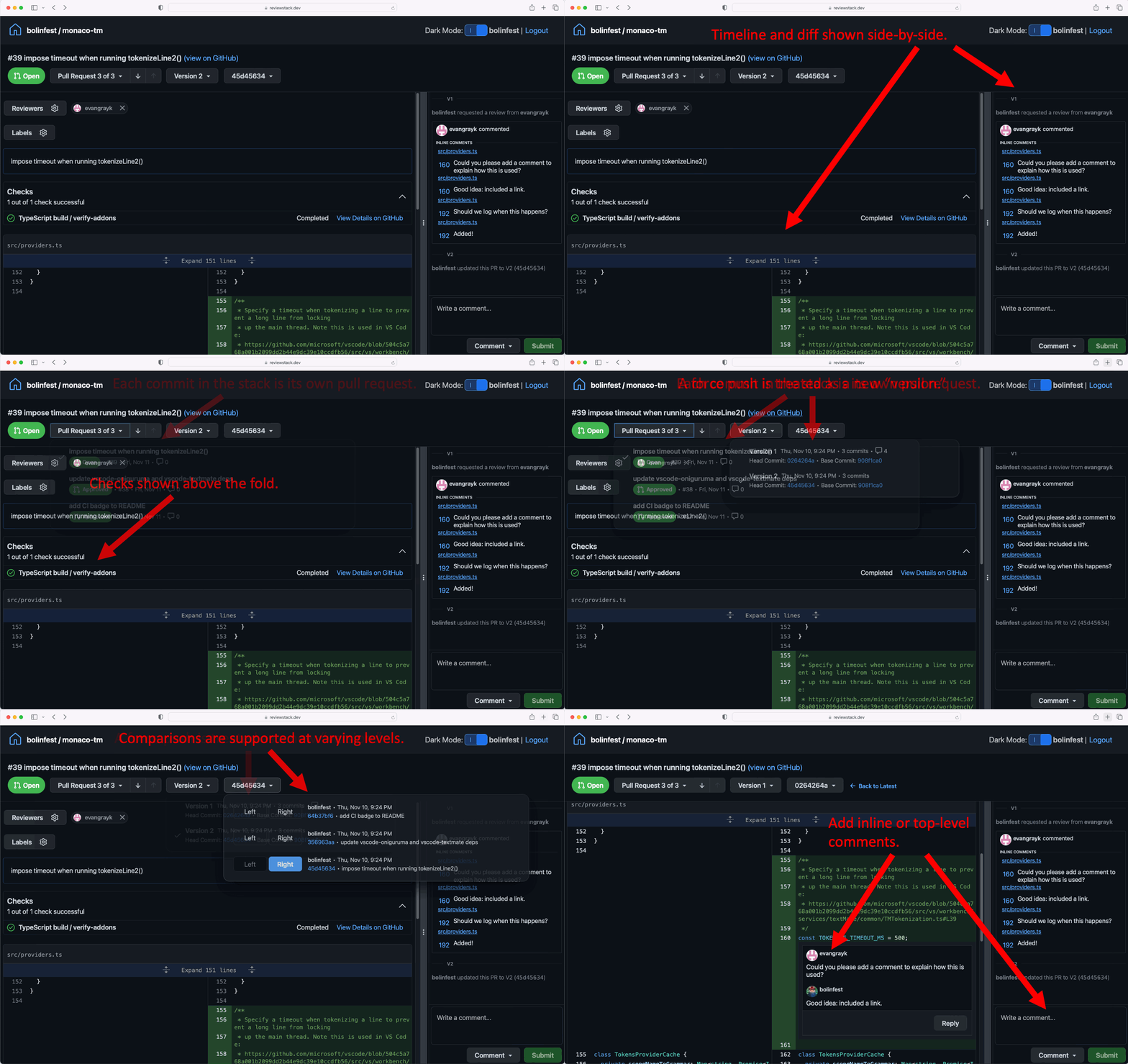
ReviewStack (reviewstack.dev) is a novel user interface for GitHub pull requests with custom support for stacked changes. The user experience is inspired by Meta's internal code review tool, but leverages GitHub's design system to achieve a look and feel that is familiar to GitHub users:
To try it out, take the URL for an existing pull request on github.com and change the domain to reviewstack.dev, so:
bolinfest/monaco-tm#39 on GitHub is available at
https://reviewstack.dev/bolinfest/monaco-tm/pull/39 on ReviewStack.
Specifically, ReviewStack recognizes stacks created by sl pr submit, sl ghstack, or stacks created from a Git repo using standalone ghstack. When it sees that your pull request is part of such a stack, it provides a dropdown for navigating the commits in the stack. This encourages discussing and approving each change independently while allowing the author to add new commits to the top of the stack without interfering with the existing conversation around the commits on the bottom of the stack.
Today, ReviewStack is focused on motivating the conversation about how an ideal stacked changes workflow should work. It is admittedly not as fully-featured or battle-tested (particularly for large pull requests) as GitHub's pull request UI. For these reasons, a pull request in ReviewStack links back to the equivalent page on GitHub so you can quickly make use of any GitHub functionality that is missing on ReviewStack.
Keyboard shortcuts
ReviewStack supports the following keyboard shortcuts:
| key | action |
|---|---|
shift+N | next PR in stack |
shift+P | previous PR in stack |
ctrl+. (cmd+. on macOS) | toggle timeline view |
alt+A | select Approve Changes action |
alt+R | select Request Changes action |
alt+C | select Comment action |
Linking to a different review tool
When sl pr submit creates a stack, it appends a footer to each pull request body with a link to the stack on reviewstack.dev. If you run your own instance of ReviewStack (or another review tool that understands stacks), you can point that link elsewhere:
[github]
pull-request-review-url-template=https://review.example.com/{owner}/{repo}/pull/{number}
pull-request-review-tool-name=MyReview
The URL template supports the {owner}, {repo}, {number}, and {hostname} placeholders. {hostname} expands to the GitHub host the repository lives on — github.com for repositories on github.com, or your GitHub Enterprise hostname; when submitting from a fork it is the upstream's host. Note that the host in the template itself is your review tool, not GitHub: {hostname} is handy when a single review-tool instance serves repositories on more than one GitHub host and needs the GitHub host in the URL to tell them apart:
[github]
pull-request-review-url-template=https://reviewstack.example.com/{hostname}/{owner}/{repo}/pull/{number}
When these configs are unset, the footer links to reviewstack.dev as before. Setting github.pull-request-include-reviewstack=false removes the review link line entirely.